Download videos from Amazon Saudi Arabia, UAE and Egypt
AmazVids works on amazon.sa, amazon.ae and amazon.eg exactly like on amazon.com, and its whole interface is available in Arabic with a right-to-left layout.
 10 free videos a day · no account · 21 Amazon stores
Step by step
- 1Install AmazVidsAdd it to Chrome or Edge from the Chrome Web Store. Free, no account.
- 2Open a product on amazon.sa, amazon.ae or amazon.egThe first time you visit one of these stores, AmazVids turns it on by itself (Smart mode).
- 3Click the AmazVids icon and SaveEvery product and review video on the page is listed. Click Save and the MP4 goes to your Downloads folder.
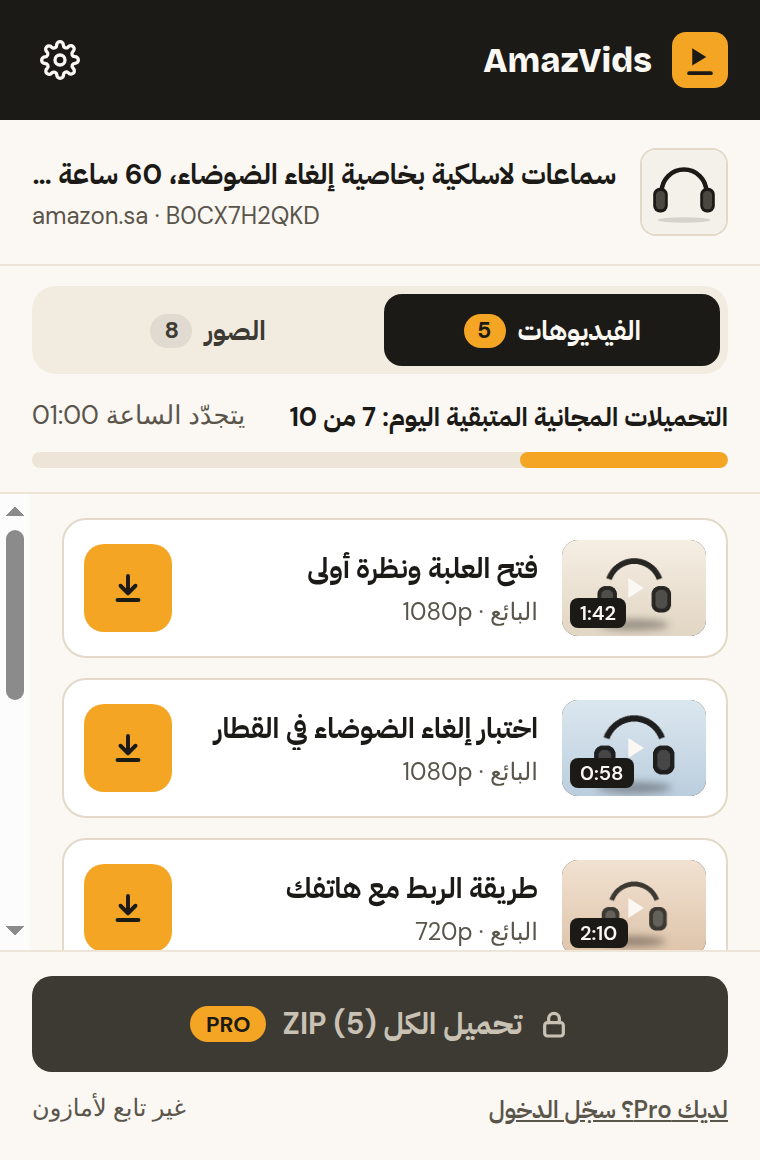
- 4Switch the language if you likeOpen Settings in the extension, then Language, and pick العربية or English. By default it follows your browser.
The pages are in Arabic, the videos are the same
Amazon shows the same product videos on the Arabic and English versions of a page, so it does not matter which one you open.
Turn a store on or off
In Settings → Marketplaces you see all 21 stores. Turn off the ones you never use, or turn off Smart mode to choose them yourself.
Questions
+Does it work on Noon or other stores?
No. AmazVids works on Amazon stores only, 21 of them.
+Can I pay for Pro from Saudi Arabia, the UAE or Egypt?
Yes. Payment is handled by Whop and accepts international cards. Prices are in US dollars.
+Is the extension in Arabic?
Yes, every screen, with a proper right-to-left layout.
Ready to try it?
10 free videos a day · no account · 21 Amazon stores