How to save Amazon customer review videos
Review videos are filmed by buyers, not the seller, which makes them the most honest look at a product. Amazon does not let you download them, but you can save them in a click with a free extension.
 10 free videos a day · no account · 21 Amazon stores
Step by step
- 1Install AmazVidsAdd it to Chrome or Edge from the Chrome Web Store. Free, no account.
- 2Open the product page and scroll to the reviewsReview videos sit in the “Customer reviews” section and in the “Reviews with images” gallery. Scrolling there makes Amazon load them.
- 3Click the AmazVids iconThe list includes the review videos together with the seller’s videos, with their length.
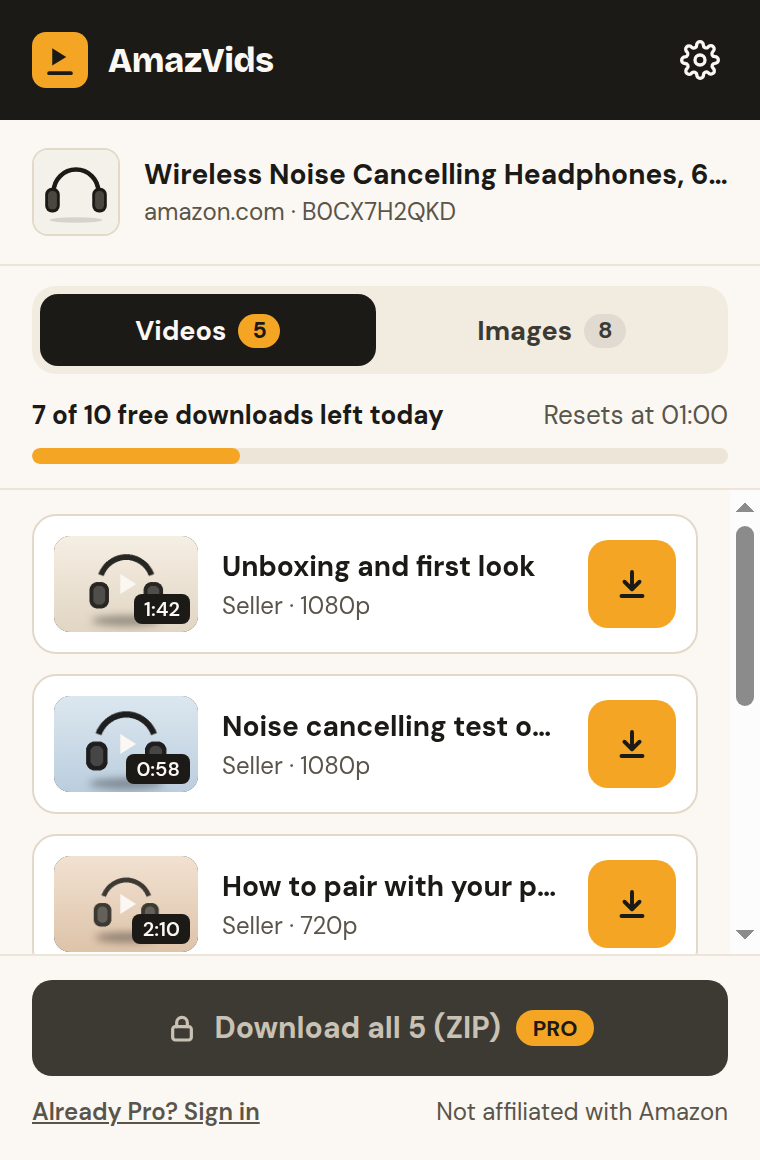
- 4Click Save on the ones you wantEach video goes to your Downloads folder as an MP4. With Pro, a Save button also appears right on each review video on the page.
What review videos are good for
Shoppers: see the real size, sound and finish before you buy, and keep the videos of products you are comparing.
Sellers: hear what buyers love and complain about in their own words. It is the fastest way to find what to improve or what to say in your listing.
Respect the people who filmed them
Review videos belong to the customers who made them. Keep them for your own reference; do not repost them or use them in ads without the creator’s permission.
Questions
+Why do I see only a few review videos?
Amazon loads more as you scroll the reviews or open the review gallery. Open AmazVids again after scrolling to see the new ones.
+Can I save all review videos at once?
Yes, with Pro: “Download all” saves every video on the page as one ZIP file.
+Does it work on amazon.sa, amazon.ae and amazon.eg?
Yes. AmazVids works on 21 Amazon stores, including all three, and its interface is also in Arabic.
Ready to try it?
10 free videos a day · no account · 21 Amazon stores