Download every video on an Amazon page at once
When a listing has five or ten videos, saving them one by one gets slow. With AmazVids Pro, one click puts them all in a single ZIP file.
 10 free videos a day · no account · 21 Amazon stores
Step by step
- 1Open the product pageScroll down to the reviews once, so Amazon loads the review videos too.
- 2Click the AmazVids iconYou see how many videos the page has.
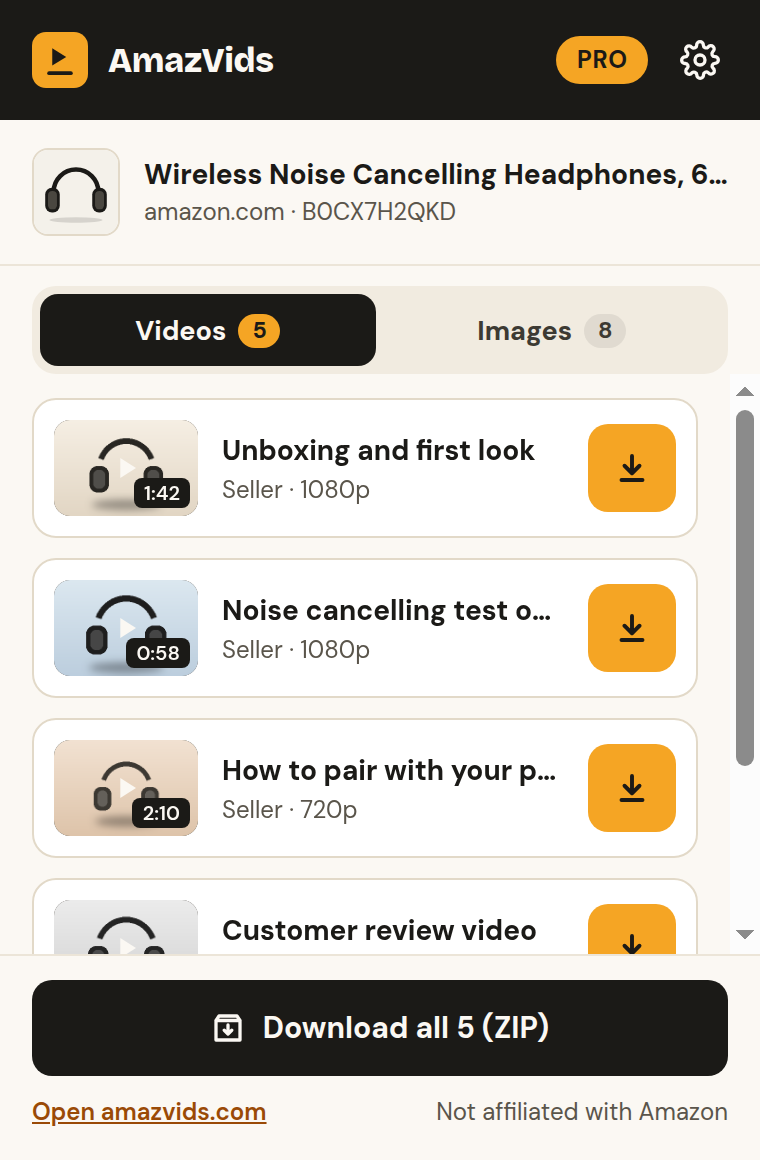
- 3Click “Download all”AmazVids collects every video and saves one ZIP named after the product, ready to unzip into a folder.
Pro only
Download all is part of Pro ($4.99 a month or $29 a year), with unlimited videos, MP3 audio, quality choice and Save buttons on the page. The free version saves videos one at a time, 10 a day.
Keep your research organised
Make one folder per niche and drop each product’s ZIP inside. Unzipped, each video keeps the product’s name, so you always know where it came from.
Questions
+Is there a limit on how many videos go in one ZIP?
No. Every video found on the page goes in. Very long pages may take a minute.
+Can I choose the quality for the ZIP?
Yes. The quality you pick in Settings (best, 1080p or 720p) is used for every video.
+Where is the ZIP saved?
In your Downloads folder, unless you turned on “Ask where to save each file” in Settings.
Ready to try it?
10 free videos a day · no account · 21 Amazon stores